


Mod Details
PremiumNo Difficulty
 Mod ID1896
CreditVarious
For
Mod ID1896
CreditVarious
For Linkhttps://evilution.co.uk/mod/453-eq-pre-conditioning-on-key.htm Copy to Clipboard
Remember when you used to be able to pre-heat the 453 using the application? Ah, the good old days. Mercedes ruined this by switching off the server.
So, What’s The Alternative?
You could add OVMS to your car.
You could program the car to pre-heat at a certain time.
You could walk out to your car, start it, turn on the heater and and go back into the house for a while.
They’re All Shit Options
Correct but there is another option that people worked out.
DDT4All To The Rescue
Back in 2021, Askold from GoSmart told me about a setting on DDT4All that allowed you to precondition the 453 EQ by holding down a button on the key.
The earliest mention of this I can find is December 2020 by Derlottootto on smart-453-forum.de
However, it was on an email 4 years later from Neelfyn who made me revisit the information.
The reason I didn’t add it back in 2021 was because I wasn’t happy about the limitation that it caused.
Limitation
You have to repurpose 1 of the buttons on the key fob in order to make it work. Obviously you can’t get rid of the lock or unlock so that leaves you with the boot (trunk) opening button. The issue then is that you can’t open the back of the car with the key. I know there’s a button on the boot lid but I didn’t want to remove functionality when I could just pre-heat the car using the app.
So I started thinking a bit more about it. Back in 2021, I didn’t have the ability to code keys so I could test any ideas myself but I had suggestions. I’ll come on to those later if you want to try any of them.
DDT4All Coding
Open the DDT4All program and connect to the car.
Click on Einstein’s face to enter expert mode.
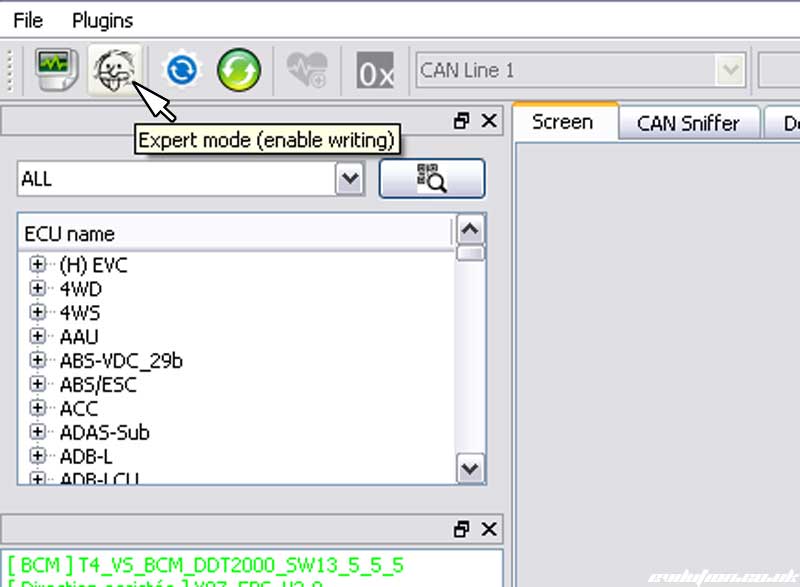
Double click T4_VS_BCM_DDT2000 found in the middle box on the left. It could also be listed under [BCM] or [UCH].

In the lower box, click BCM Monitor to open up the options then double click BCM Monitor – Configuration.

The main window will now populate with data. Find PRECOND_BY_KEY_CF and change it to PC_BY_KEY_3 and press the Send button to code the car.

Or you can select PC_BY_KEY_4 if you have read some of the thoughts later on.

That has coded the button on the key to work but you have to disable the boot opening too. In the lower left box, find Doorlock, click it to open the options. Double click Doorlock – Configuration to populate the main window.

Click on Einstein’s face to enter expert mode.
Find RKE_BACK_DOOR_OPENING_CF and change it to False. Click Send to code it to the car.

As with all coding, it may not work until you disconnect the 12v battery for 10 minutes.
Ideas For You To Try
What about using an American 453 key? they have 4 buttons and DDT4All does have the option to code it for the 4th button?

The initial problem I saw back in 2021 was that they American keys run on 315mhz where the Euro keys use 433mhz so there wasn’t any chance of that working.
However, Chinese companies on AliExpress now seem to sell 4 button keys that apparently use 433mhz. I’m not sure if I trust their description as I don’t see what such a thing would need to exist.
Alternatively, if you are really brave, you could try moving the buttons because Renault were good enough to give us many placement options. Here’s the standard 3 button PCB.

And here is that next to the 4 button PCB (although the 4 button PCB in the photo is a Chinese copy).

So it looks like it’s possible to shift the buttons around and add a 4th.

Because you have modified your existing key, the frequency will be correct. However, will the buttons work as expected?
You Tell Me
Attila W tested PC_BY_KEY_1 and PC_BY_KEY_2 and said that neither worked.